Page Builder
A modular editor to build pages.
Setup
/// webpack.config.js

const path = require("path");

module.exports = {
  optimization: {
    minimize: false,
  },
  resolve: {
    alias: {
      // Add your aliases here
      // '@': path.resolve(),
      "@components": path.resolve("app/Domains/PageBuilder/Components"),
      "@pagebuilder": path.resolve("vendor/libaro/kick-start/src/PageBuilder"),
      vue: path.resolve(`node_modules/vue`),
    },
  },
};
Usage
Directives
To implement the Page Builder into your project, you can use the following Blade Directives:
@pagebuilder(id)This Directive should be used to load the Pagebuilder into your backend. This will inject the Page Builder VueJS Component.
@pagebuilder_cssThis should be added to the head, or wherever you load your styles, to inject the correct stylesheet used by the Page Builder.
Components
Location
PageBuilder uses components to build and render the page. Each component has a corresponding Blade view. The Blade views are located in 'vendor/libaro/kick-start/src/PageBuilder/Views'. Since version '2.3.1', the Blade views need to be copied over to your project. Either in 'resources/views/pagebuilder' or in the directory which is returned from 'pagebuilder::COMPONENT_NAME'.
Default Components
The default components included in the Page Builder are:
- Container: A container for other components.
- RTE: A rich text editor.
- Image: An image uploader.
- HTML: A component to insert raw HTML.
- Table Of Contents: A component to insert a table of contents. (since v 2.6.0). Add an id="" to each Blade view.
Adding Custom Components
To add a custom component, you need to:
Version 2.3.2 and above
- Create a directory in your project to contain your custom components.
- Point the 'components_path' key in your pagebuilder config file to this directory.
    /*
     * Location for custom components
     * Additional components can be added to PageBuilder.
     * Set the path to the directory where you store your components.
     * Set to false to disable this feature.
     */
    'components_path' => 'App\Domains\PageBuilder\Components',
Version 2.3.1 and below
- Create a directory 'App\Domains\PageBuilder\Components' in your project.
All versions
- Add for each custom component the following files:
COMPONENT_NAME.phpCOMPONENT_NAME.vue- Simply copy an example from the pagebuilder package as a starting point. These files will be used to render the component in the Page Builder.
- Add a
COMPONENT_NAME.blade.php file to the directory where your component blade files are located. This file will be used to render the component.
Authentication
The PageBuilder endpoints use the 'auth:sanctum' middleware. To enable this in your app, uncomment \Laravel\Sanctum\Http\Middleware\EnsureFrontendRequestsAreStateful::class in App\Http\Kernel
    protected $middlewareGroups = [
        'web' => [
            EncryptCookies::class,
            AddQueuedCookiesToResponse::class,
            StartSession::class,
            // \Illuminate\Session\Middleware\AuthenticateSession::class,
            ShareErrorsFromSession::class,
            VerifyCsrfToken::class,
            SubstituteBindings::class,
            HandleAdminInertiaRequests::class,
        ],
        'api' => [
            \Laravel\Sanctum\Http\Middleware\EnsureFrontendRequestsAreStateful::class,
            'throttle:api',
            SubstituteBindings::class,
        ],
    ];
Translations
General
The PageBuilder supports translations. This enables translations of content, not the user interface. This can be enabled through the PageBuilder config file in your project.
Config settings
    'languages' => [
        'model' => Language::class,
        'name' => 'name',
        'code' => 'key',
        'default' => false,
        'generator' => LanguageGenerator::class,
],model: the class which is used to work with languages in your project. If this is set to false, then language support will be disabled.name: the field of your language model to get the name of the languagecode: the field of your language model to get the key of the language. The code will be used to store and read translatable fields in your database.default: must be a validcode, or false if disabledgenerator: a language generator class.
Generator class
If the generator key is set to false, than a $model::all() will be performed to get the supported languages. If you need some more control, than you can supply the generator key a Generator class.
The generator class needs to implement an execute() function. This function should return an array with the keys languages and default.
Example
An example of a generator class. Here we return the languages and default language used for the account attached to the currently logged in user.
<?php

namespace App\Domains\PageBuilder\Generators;

class LanguageGenerator
{
    public function execute(): array
    {
        return [
            'languages' => $this->getLanguages(),
            'default' => $this->getDefaultLanguage(),
        ];
    }

    /**
     * Return the key of the default language of the current account
     * @return string
     */
    protected function getDefaultLanguage(): string
    {
        $default = account()->defaultLanguage;

        if ($default) {
            return $default->key;
        }

        return 'en';
    }

    /*
     * Return the languages linked to the current account
     */
    public function getLanguages()
    {
        return account()->languages->map(function ($lang) {
            return [
                'key' => $lang->key,
                'name' => $lang->name,
            ];
        })->toArray();
    }
}
Set Link
General
The PageBuilder can show a link to the current page in the frontend. As this is project specific, you will need to provide a site_link_generator. This option is disabled if this is set to false.
Config
    /*
     * Show a link in PageBuilder to view the page on the site
     * Defaults to: false
     * Enable this by providing a generator class
     * The generator class receives the pageID and lang through it's constructor
     * And should implement an execute function which returns a json response with a link
     */
    'site_link_generator' => \App\Domains\PageBuilder\Generators\SiteLinkGenerator::class,
Generator class
The generator class is responsible for returning the link to current page. For this to be possible, the generator class receives the pageID and lang through it's constructor.
    public function __construct($pageID, $lang)
    {
        $this->pageID = $pageID;
        $this->lang = $lang;
    }
The generator class needs to implement an execute function which needs to return a json response which inlcudes the link
    public function execute()
    {
        $url = URL::route('pages.show', ['page' => $this->pageID, 'lang' => $this->lang]);
        return response()->json([
            'link' => $url,
        ]);
    }
Default Page Settings (since v2.2.0)
General
The PageBuilder has default page settings it provides. These settings are available in the Page Settings panel.
Disable
You can however disable this by setting the default_page_settings key in your config file to false, this will hide all default page settings.
'default_page_settings' => false,Customize
Or you can provide the default_page_settings key an array. Then only the keys in this array will be available in the Page Settings panel. The available keys are:
publishedtitleslugseo_titleseo_descriptionimageis_top_selectedis_featuredauthor
'default_page_settings' => ['title', 'slug', 'published'],Project Specific Page Settings (since v2.1.0)
General
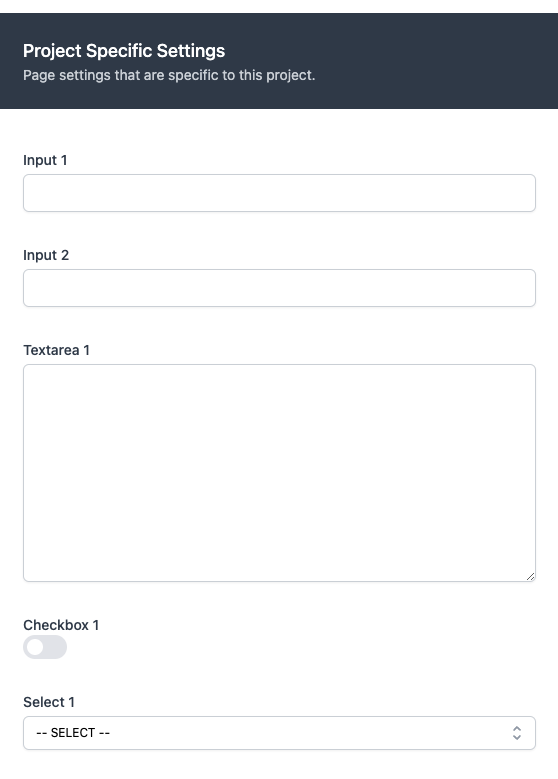
Page settings can be extended with project specific page settings. When included, these will be shown in the 'Page Settings' panel, in a seperate section below the general page settings.
PageSettings
To add project specific settings, you need to create a class App\Domains\PageBuilder\Extenders\PageSettings, which implements a toArray() method. This method needs to return an array of Libaro\KickStart\PageBuilder\ValueObjects\PageSetting instances. Each instance of PageSetting will render the desired input method in the Page Settings panel. Your App\Domains\PageBuilder\Extenders\PageSettings class will receive the current page through it's constructor.
PageSetting
A PageSetting needs:
name: String=> this is the field used to differentiate the setting and can be used to get it's value ($page->settings->$name).displayName: String=> the name which will be shown in the page settings panel in PageBuilder.type: String=> use one of the constants provided by PageSettingTypes. Currently supports: input, textarea, checkbox and select.translatable: Bool=> if the field should contain keys for each supported language in your project. Only used for types: input and textarea.required: Bool=> if the field should be marked as required. No validation provided yet.
If you create a select. You need to add options through the addOption($name, $displayName) method.
Then call toPageBuilderComponent() on your instance of PageSetting, to receive a valid formatted array.
Example
<?php

namespace App\Domains\PageBuilder\Extenders;

use Libaro\KickStart\PageBuilder\Models\Page;
use Libaro\KickStart\PageBuilder\ValueObjects\PageSetting;
use Libaro\KickStart\PageBuilder\ValueObjects\PageSettingTypes;

class PageSettings
{
    protected Page $page;

    public function __construct(Page $page)
    {
        $this->page = $page;
    }

    public function toArray(): array
    {
        $select = (new PageSetting('select_1', 'Select 1', PageSettingTypes::Select, true, true));
        $select->addOption('Option 1', 'option_1');
        $select->addOption('Option 2', 'option_2');
        $select->addOption('Option 3', 'option_3');

        return [
            (new PageSetting('input_1', 'Input 1', PageSettingTypes::Input, true, true))->toPageBuilderComponent(),
            (new PageSetting('input_2', 'Input 2', PageSettingTypes::Input, false, true))->toPageBuilderComponent(),
            (new PageSetting('textarea_1', 'Textarea 1', PageSettingTypes::Textarea, true, true))->toPageBuilderComponent(),
            (new PageSetting('checkbox_1', 'Checkbox 1', PageSettingTypes::Checkbox, true, true))->toPageBuilderComponent(),
            $select->toPageBuilderComponent(),
        ];
    }
}